RADIUS
Overview
Swivel is a RADIUS server and can accept requests from Network Access Servers (NAS/RADIUS Clients) that ask authentication information from the Swivel RADIUS sever. For non RADIUS devices, Swivel supports an XML authentication.
Configuring the Swivel server
From the Swivel Administration Console select RADIUSServer
Options are:
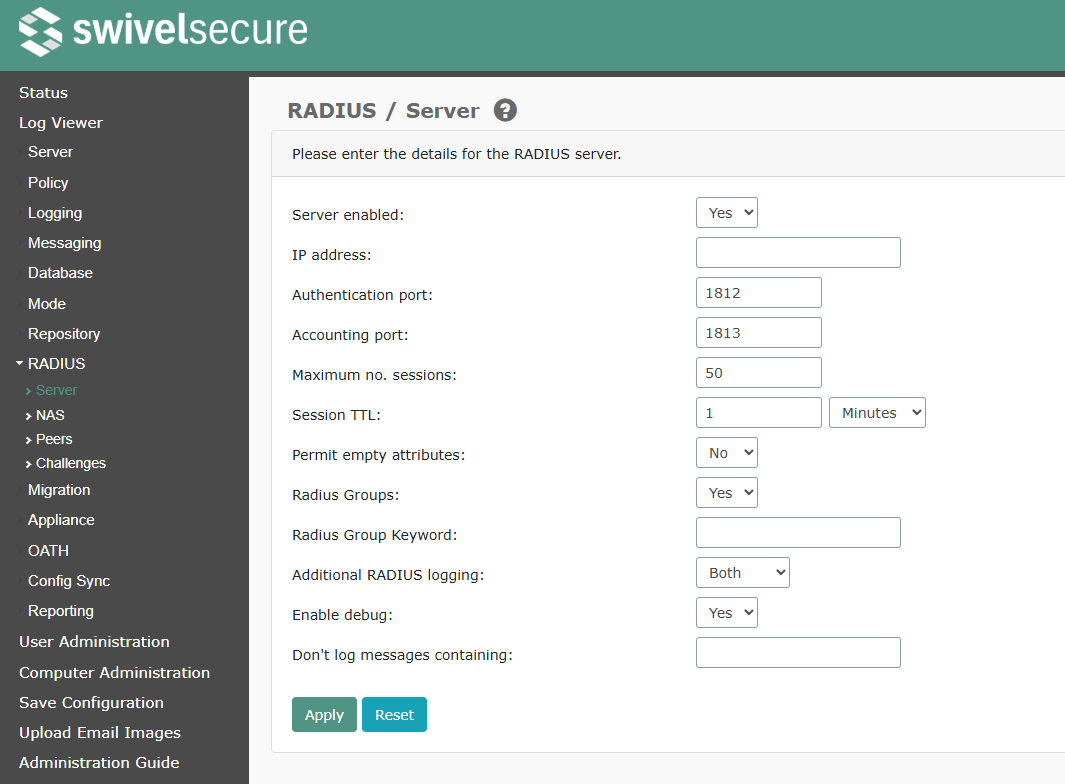
Swivel RADIUS server options
Server enabled: Yes/No, default No, select Yes to start the Swivel server
IP address: The IP address of the Swivel server interface which will accept authentication requests. To accept requests on multiple interfaces, leave the entry blank. Note: Do not use the VIP for this address as the RADIUS server will only start if the VIP is assigned and RADIUS responses will come from the server real IP address.
Authentication port: default 1812, commonly also 1645 is used. This is UDP
Accounting port: default 1813, commonly also 1646 is used. This is UDP
Maximum no. sessions: default 50, Maximum number of concurrent requests
Session TTL: 1-600 seconds
Permit empty attributes: Yes/No, Enable/disable the servicing of RADIUS requests containing empty attributes. The RADIUS standard states that empty attributes should not be used, and by default these non-conforming requests will be dropped. Enabling this option will allow the RADIUS server to operate with clients who do not adhere to the standard and send empty attributes.
Radius Groups: Yes/No, Allows group membership information to be passed back with the RADIUS response, using the parameters defined in the Vendor Group on the NAS. Enabling this option will return the Swivel Group as a RADIUS Group.
Radius Group Keyword: default POLICY, This restricts the group membership information to only pass back the group names that include this keyword
Additional RADIUS logging: None/Failure/Success/Both, Enable/disable additional information, this will add the RADIUS entries for successful and failed RADIUS authentication attempts
Enable debug: Yes/No, Enable/disable, debugging of RADIUS authentication
Don’t log messages containing allows you to specify that certain RADIUS messages are ignored: useful to filter out monitoring traffic
Configuring the NAS Client Information
The RADIUS NAS allows devices to communicate with the Swivel core for authentication information. Only devices specified by IP address and shared secret are permited to authenticate. It’s not possible to create multiple NAS entries from the same IP address.
From the Swivel Administration Console select RADIUSNAS
Options are:
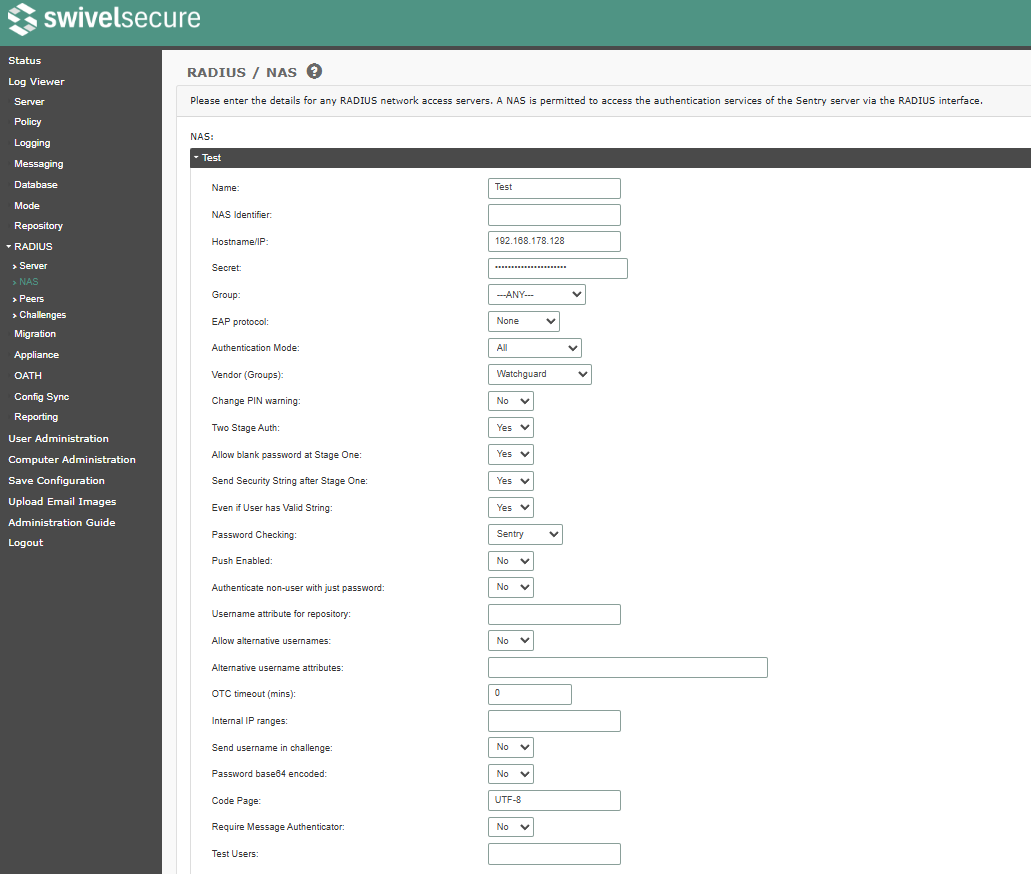
Name: Descriptive name of access device, this will be reported in logs
NAS Identifier: Optional. If specified, this must match the NAS_Identifier attribute sent by the NAS. Using this setting allows for multiple NAS entries for the same IP address
Hostname/IP: IP address of the access device
Secret: a shared secret, this can be an alphanumeric string that must be also entered on the access device
Group: —ANY—/Swivel groups, allows only specific groups to authenticate to access device
EAP protocol: None/EAP-MD5/LEAP, Allows RADIUS EAP protocol to be specified, choices being EAP-MD5 and LEAP. If this is left as None, RADIUS will support PAP, CHAP and MS-CHAP
Authentication Mode: All/Dual Channel/Single Channel, allows only specific authentication method to authenticate to access device
Vendor (Groups): default: None, Vendor Specific parameters, possible options are:
None
Fortinet
Cisco
Watchguard
PaloAlto
SonicWall
SingleGroup
Cisco ACL
Sophos
Cisco Nexus ACL
Change PIN warning: Yes/No, default: No, When a user is authenticates, Swivel can return a change PIN response if the user is required to change their PIN, allowing access devices that support this function to redirect to a Change PIN page.
Two Stage Auth: Yes/No, default: No, Two Stage Authentication is where a user enters a password, and then is taken to a second page for a One Time Code. The user must have a password for authentication. The benefit of two stage authentication is that the One Time Code field is protected against brute force attacks.
Allow blank password at Stage One: Yes/No. If No (the default), the first stage of a two-stage authentication must include a non-blank password
Send Security String after Stage One: Yes/No, Swivel 3.9.6 onwards, send a security string when stage one of Two stage Auth is used. Allows Multiple Security strings and Mobile Client.
Even if User has Valid String:” Yes/No. Following on from the previous setting, suppress sending a security string if the user already has one, unless this is Yes
Password Checking
None no password is checked, only PIN
Sentry check against Sentry password, if the user has one
Repository check against the repository (e.g. AD) password
Note that this option is restricted to PAP authentication. This feature is generally used where the access device can only authenticate against one authentication device. This option was moved from a global setting to a RADIUS NAS and Agent setting in Swivel 3.8. See Password How to Guide and LDAP How to Guide.
Push Enabled if Yes, a successful password check in the first stage RADIUS request results in sending a Push request to the user’s mobile app. The Push response forms the second stage authentication.
Authenticate non-user with just password: Yes/No, swivel 3.9.6 onwards. This allows a non Swivel user to be authenticated with just their repository password. See Password How to Guide. See also RADIUS Static Password.
Username attribute for repository: Default blank, if Check Password with repository is enabled, this defines which attribute is passed to the repository as the username. If blank, the account username and fully-qualified domain name (for LDAP) are both tried.
Allow alternative usernames: Yes/No, Swivel 3.9.1 onwards. Allow the user to authenticate with differing usernames.
Alternative username attributes Swivel 3.9.1 onwards. Comma separated list of attributes allowed for authentication. See User Attributes How To.
OTC timeout (mins): default 0, If > 0, the time (in minutes) before a user on the internal network needs to reauthenticate to Swivel. See the next option for what constitutes an internal user. External users must always reauthenticate to Swivel.
Internal IP ranges: The IP ranges which constitute the internal network, when the OTC timeout option is active. These can be specified in CIDR notation, and multiple networks can be specified, separated by commas. For this feature to work, the RADIUS NAS must be capable of sending the calling station ID to the Swivel server as part of the RADIUS request. Otherwise, the NAS IP will be used.
Send username in challenge: Yes/No, default No, if enabled, the challenge sent by Swivel after a successful password in a two-stage authentication will consist of the username followed by a colon, then the usual challenge. This allows for customisation of NAS challenge pages where the username is not included in the page.
Password base64 encoded: Reserved for future enhancement - leave this as No
Code Page: The code page / encoding to use for incoming RADIUS requests, to handle non-ASCII characters
Require Message Authenticator: It is recommended that you enable this to avoid known vulnerabilities in RADIUS authentication
Test Users: A list of usernames that should be ignored when logging. Typically monitor users, which would fill the logs
Swivel RADIUS Proxy
See Also RADIUS Proxy How to guide
Swivel PINsafe 3.7 onwards can proxy RADIUS requests against other RADIUS servers. This allows Swivel to be inserted into an existing RADIUS infrastructure such as where tokens are being used, so such solutions can be used in parallel.
The RADIUS proxy is set on the Swivel Administration Console under RADIUS/Peers
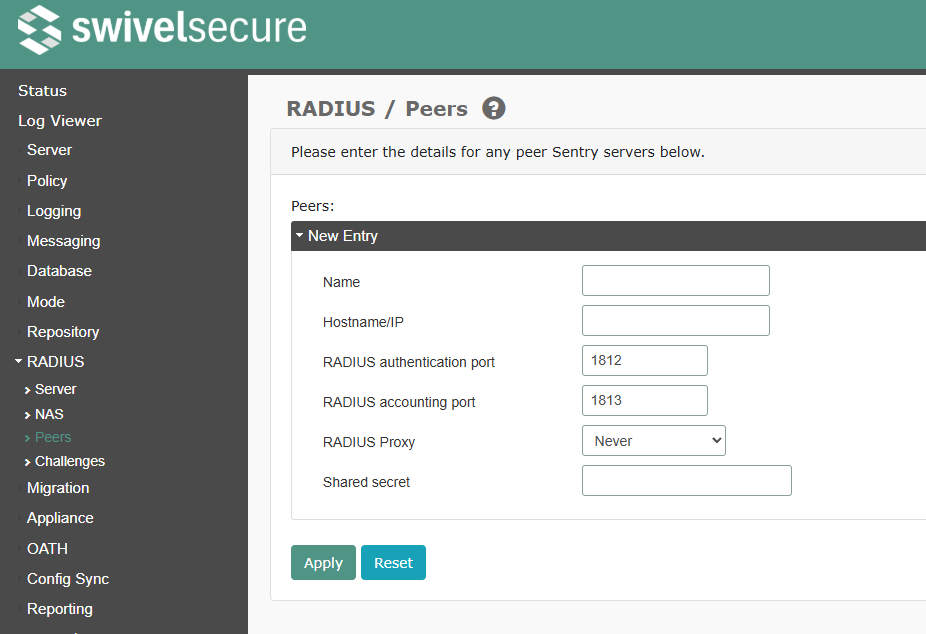
The RADIUS proxy functions in the following manner.
Name: Descriptive Name used for logging information
Hostname/IP: Hostname/IP address of RADIUS server to be proxied against
RADIUS authentication port: Authentication port to be used for RADIUS server to be proxied against. Usually 1812 or 1645
RADIUS accounting port: Accounting port to be used for RADIUS server to be proxied against. Usually 1813 or 1646
Shared secret: A shared secret which must be the same as that entered on the RADIUS server to be proxied against.
RADIUS Challenges
When using two-stage authentication, behaviour between the first and second stage can vary according to the group a user belongs to. This page configures atypical behaviour.
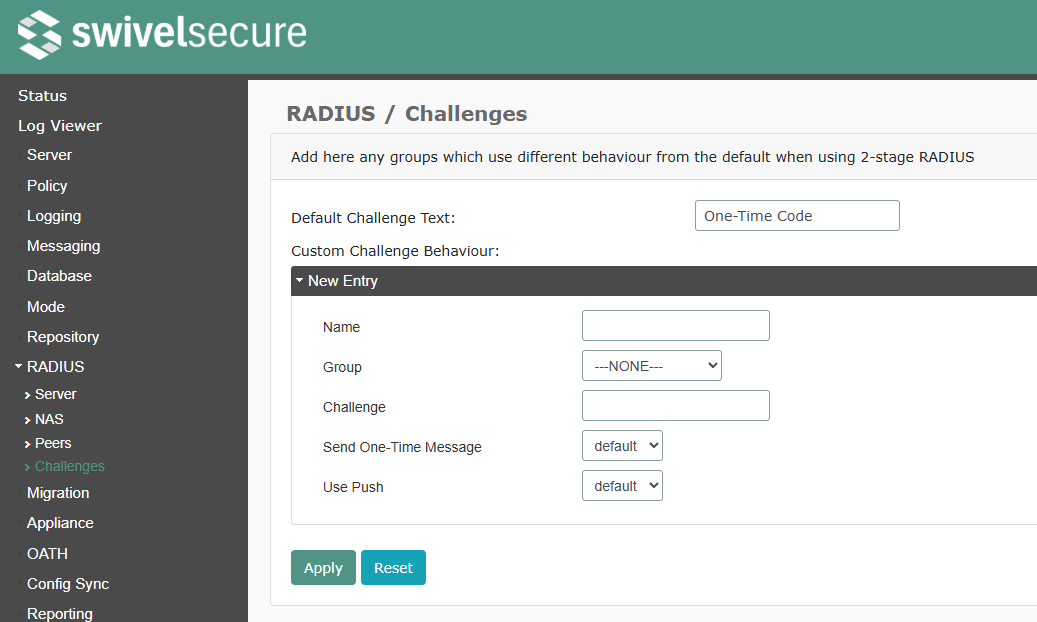
Default Challenge Text: The default text to send in an Authenticate_Challenge response
For each custom challenge behaviour, you can specify the following:
Name The behaviour name, for descriptive purposes only
Group The group to which this behaviour should apply
Challenge The text to send in the response. If blank, the default text is used
Send One-Time Message Can be default (use the default behaviour), true or false
Use Push same options as the previous setting
Configuring the Access Device
Exact options will vary according to access device, but they are typically:
Primary RADIUS Server/Secondary RADIUS Server: allows configuration of more than one RADIUS server for redundancy, the primary RADIUS server is tried and if a reply is not received, then the secondary server is tried.
RADIUS server Name or Identifier: Name of Swivel server
Hostname/IP: IP address of the Swivel server
Secret: a shared secret, this can be an alphanumeric string that must be also entered on the Swivel server NAS entry
One Time Code or token: this will prevent the access device reusing an authentication code
PAP
With RADIUS PAP protocol, the NAS sends username and password and the RADIUS server authenticates. With all other RADIUS protocols, the NAS requests the password for the user and authenticates itself. Also see Mobile Phone Client RADIUS Authentication
Check Password With Repository
This requires the use of PAP, see Passwords with PINsafe How to Guide
RADIUS Groups
By default, the RADIUS group is set to None, and does not send back a RADIUS group. On the Swivel Administration console the setting for Enable Groups under RADIUSServer, when enabled, will return the users Swivel group membership as a RADIUS group. If the vendor group is not listed test with other vendor groups. See also RADIUS Groups.
The vendor Watchguard uses Filter ID 11 for group and can be used for Juniper.
Calling Station ID
Calling Station ID is a standard RADIUS attribute which indicates the IP address of the authentication requester. It has to be forwarded by the NAS (i.e. Access device such as the Netscaler)), since the Swivel server does not have a direct connection to the client machine. If the NAS Access device can be configured to forward calling station ID, then recent versions of Swivel will record this information.
Mobile Client (Java Midlet or Swivlet)
One thing to be aware of is that when using RADIUS authentication with the Swivlet, except for the PAP protocol, you must use every string from the phone for authentication. If you generate a string and don’t use it, authentication will fail until you Top Up again. This is an unavoidable consequence of the way most RADIUS protocols work. Also see Mobile Phone Client RADIUS Authentication
Testing
Check the Swivel log for authentication requests. If there are no authentication requests check:
The RADIUS connection is reaching Swivel and not blocked by a firewall
The Swivel RADIUS server is running. Stop the Swivel RADIUS service, then restart and check the log to see it has started.
Even if there is no NAS entry or a failed authentication, a RADIUS request to the Swivel server should be seen.
RADIUS: <7> Access-Accept(2) LEN=77 172.16.1.99:47186 Access-Request by username succeeded
Successful RADIUS request
RADIUS_MSCHAPV2 MSCHAP V2 RADIUS request
RADIUS_CHAP RADIUS request
RADIUS_PAP RADIUS request
Known Issues
VIP Configuration
Do not use the VIP for the RADIUS server address as the RADIUS server will only start if the VIP is assigned, see RADIUS server failed to start
RADIUS requests sent to the VIP will send responses from the real IP address and are often rejected by the access device, to overcome this specify the real IP address.
The Single Channel images may use the VIP and the authentication may be sent to a different Swivel instance, to overcome this it is possible to use Session Sharing
MS-CHAP and MS-CHAP V2 Account Locking
RADIUS clients using MS-CHAP and MS-CHAP V2 may not lock acounts due to failed login attempts in Swivel up to version 3.10.4
EAP MSCHAPv2
Swivel currently does not support EAP MSCHAPv2
Special Characters
Up to version and including 3.9.7 a ‘-’ or a ‘,’ were treated as characters used with Mobile Phone Client and SMS for Multiple Security Strings, if a password contained these and was 3 characters from the end, it would be incorrectly interpreted as a Sting Index, This is resolved in Swivel 3.10.4 for users with a PIN. PINless users remain affected by this in versions up and including 3.10.4.
Removing NAS entry corrupts other Shared Secrets
When a NAS entry is removed it may corrupt the other NAS entries. This can be resolved by upgrading to Swivel version 3.10. For previous versions re-enter the RADIUS NAS secret.
RADIUS Troubleshooting
Check the Swivel logs for RADIUS messages.
Has the RADIUS service been started, on the Swivel Administration Console, select RADIUS/Server, and ensure Server enabled is set to yes.
To check that RADIUS is starting ok, set Server enabled to No, Apply the settings, then set to Yes, and Apply the settings again. Check the Swivel logs which should show the following
INFO RADIUS server manager started.

INFO RADIUS: RADIUS Receiver Started: listening on port 1813

INFO RADIUS: RADIUS Receiver Started: listening on port 1812
Mobile Phone Client RADIUS Authentication
RADIUS: <72> Access-Request(1) LEN=130 192.168.1.1:9328 Access-Request by domainuser Failed: AccessRejectException: AGENT_ERROR_NO_USER_DATA
Where the domain name is required to differentiate users of the same name, set the Swivel repository username attribute to be userPrincipalName, and instead login with username@domain. You are unable to pass DOMAINusername in a RADIUS request.
Access-Request by qwerty Failed: AccessRejectException: AGENT_ERROR_METHOD_UNSUPPORTED
Login failed for user: qwerty, error: The chosen RADIUS authentication method is not supported RADIUS_EAP_OTHER,0
An EAP RADIUS request has been received but the Swivel RADIUS client has not been configured to use EAP.
RADIUS: <15> Access-Request(1) LEN=161 192.168.1.1:57393 Access-Request by qwerty RESPONSE PACKET NOT SENT - FAILED VALIDATION AccessDropException: EAP Packet reply to EAP-Identity response packet has no State attribute or has timed out.
192.168.1.1 client:RADIUS_ACCESS_DROP_EXCEPTION, AccessDropException: EAP Packet reply to EAP-Identity response packet has no State attribute or has timed out.
RADIUS client is using EAP MSCHAPv2 which is currently not supported
RADIUS: Exception in thread: DATAGRAM LEN = 46 FROM 192.168.1.10:62831 java.lang.NullPointerException at com.swiveltechnologies.pinsafe.server.user.repository.AbstractRepositoryBase.getAttribute(AbstractRepositoryBase.java:149) at com.swiveltechnologies.pinsafe.server.radius.RadiusAccess.authenticate(RadiusAccess.java:480) at com.theorem.radserver3.RADIUSSession.o(Unknown Source) at com.theorem.radserver3.RADIUSSession.e(Unknown Source) at com.theorem.radserver3.RADIUSSession.run(Unknown Source) at java.lang.Thread.run(Unknown Source)
This error can be seen when Authenticate non-user with just password: is enabled but the user does not exist in Swivel or the repository against which it is checked.